Google Chrome
Safe, fast, and reliable browsing with Google Chrome

Safe & Secure

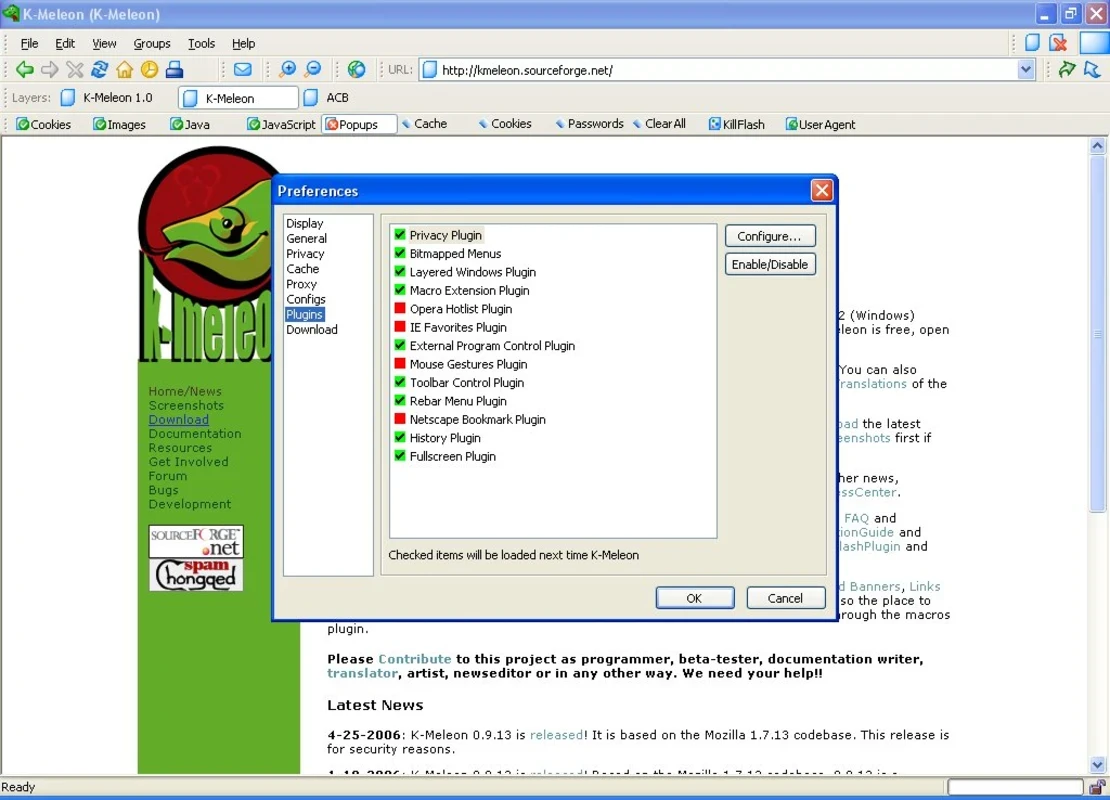

K-Meleon is an open-source web browser to empower an awesome internet browsing experience, embedding innovative functionalities, including Tab browsing, RSS feeds, and multi-search options. The portable capability helps to import preferences, favorites, and other settings from your usual browser.
The browser proves to be the best alternative to other popular standard browsers, offering a fast, free, and customizable environment, specifically designed for Windows operating systems. It is based on the Gecko engine offered by Firefox.
K-Meleon, developed by Christophe Thibault, falls under the Network & Internet category as Browser list of programs, and was published in the 2000s. It is a free, open-source, and lightweight utility that utilizes the Windows API and renders web pages with the Gecko engine. It offers fast support for Win32, legacy operating systems, and even old machines. It is available under the GNU General Public License.
The app is available in English and is mostly used by people in the United Kingdom, Ghana, and Latvia. It offers extensive customization options, tailoring the browsing experience according to user preferences.
It is one of the most significant features, as offered by multiple standard web browsers, enabling users to open multiple sites simultaneously and reliably switch between them with a single click. All the tabs are located alongside on a separate toolbar within the browser. It helps to avoid going back and starting a new session; instead, you can easily manage extensive web searches and run multiple applications while keeping the Windows taskbar decluttered.
User privacy becomes the most concerning element, specifically for browsers that use telemetry. But the software offers Privacy Bar, enriched with multiple innovative privacy settings, including blocking pop-ups, cookies, JavaScript, common ads, and so on. Moreover, it saves the login information and prevents unauthorized access to your computer while offering master password protection, specifically for users who have to share their machine with multiple people.
The app offers the exclusive service of enabling users to use their existing Internet Explorer Favorites or Opera Hotlist, replacing as well as along with Netscape/Mozilla’s Bookmarks system, such as Tabbed browsing, Mouse gestures, complete toolbar, menu, context menu, and keyword customization, block pop-up windows, fast load time, Easy web searching, Themes & skins, and Macros.
The user interface with an intuitive and clean layout offers quick navigation. It is easily customizable, allowing users to modify toolbars, menus, and other elements according to their preferences. However, the layout won’t look sharp, and dealing with tabs feels like a chore, as the tabs are managed through a context menu requiring multiple clicks. It looks quite similar to Internet Explorer, so users who have already used IE can easily go with it.
It is another core feature that was introduced by Opera at first, and now has become a common staple in multiple browsers. It is one of the useful plugins, allowing you to slide your mouse left or right to go back or forward while right-clicking on a page, and it makes your navigation on the web fast and easy. Similar to other plugins, it is also customizable, enabling users to make changes according to their preferences.
The extensive user customization options are available for the ease of users to revamp the main menu and context menus. You can delete as well as add your desired items, and use your toolbar to access any function, or use keyboard shortcuts to access any function. You will find everything simple and easily accessible, instead of adding extensions, as the use of multiple extensions can cause other unwanted items.
It is another innovative feature allowing users to click on the “Search” button, using your toolbar, and type keywords to search with Google. You can use the keyboard shortcut “Ctrl + G” by default to view the search prompt. You can change it according to your preferences, or even search right from the URL bar with support for Microsoft Quick Search and Mozilla keywords.
The app is lightweight and uses very light over your system resources that is built on the Gecko rendering engine. It offers uncompromised fast browsing speed and enhanced performance. You can also extend the functionality and productivity by adding a variety of add-ons such as ad blockers, a download manager, and so on.
Pros
Cons

Safe, fast, and reliable browsing with Google Chrome

Opera offers the best browsing functionalities including built-in VPN, ad-blocker, and Turbo mode.

Fast Browsing with offering Cutting-edge Security and Speed.

UC Browser for PC, the leading mobile browser now available for PCs

Cent Browser is a Chromium-based browser with seamless browsing online

Firefox can display a large number of pages and extra capabilities that can help you online very fast.